Try Maverick Excelsior - For Free
Try Maverick Excelsior - For Free
Hey everyone! Víctor here.
Maverick Excelsior was launched in 2022, and the response from the 3D jewelry design and online retail community has been nothing short of amazing. Since then, we’ve received countless support requests and answered many questions, but one of the most common requests has always been the same: “Can I try Maverick Excelsior before buying it?”
A perfectly reasonable request, but until recently, it wasn’t possible because it required special attention from Chema and his team.
In the meantime, I often ended up doing one-on-one demos to showcase Excelsior running on the client's computer. And honestly, it never took long for people to realize Maverick Excelsior was exactly what they needed.
So here it is: no more struggling with complicated lighting setups or fighting to get consistent, realistic results across different 3D jewelry models.
One of Excelsior’s strongest points has always been its diamonds and gemstones. Anyone who has spent endless hours trying to make those tiny cursed stones look right knows how difficult it is to get them to shine with the right sparkle, contrast, and brilliance without looking like a fake render from 10 years ago.
With Maverick Excelsior, that problem, the single hardest challenge in jewelry rendering, is gone. Thanks to our custom technology and countless hours of testing against real photography, we’ve achieved the natural, photorealistic look every jeweler dreams of.
Be sure to check out our sample jewelry catalog. In the gemstones section, you’ll see just how photorealistic Excelsior can be.
Spin the 3D spinner samples of different gemstone cuts, and you’ll see how refraction, dispersion, and sparkles behave. That exact same realism will be applied to your own 3D jewelry models with zero extra effort.
What Is the Maverick Excelsior Demo?
As I mentioned, the demand to try Excelsior before buying has been overwhelming. With the launch of our new website, our team set out to build a Demo Version of Excelsior.
Now, we’re offering a free-to-use version of the full editor so you can play with it and start learning how to use Maverick Excelsior yourself.
And that’s the idea, to be playful and play. Excelsior is so intuitive it almost feels like a game. A few clicks get you results that would take hours of tedious work in other software.
And of course, you’ll need some toys to play with. That’s where our sample jewelry models come in.
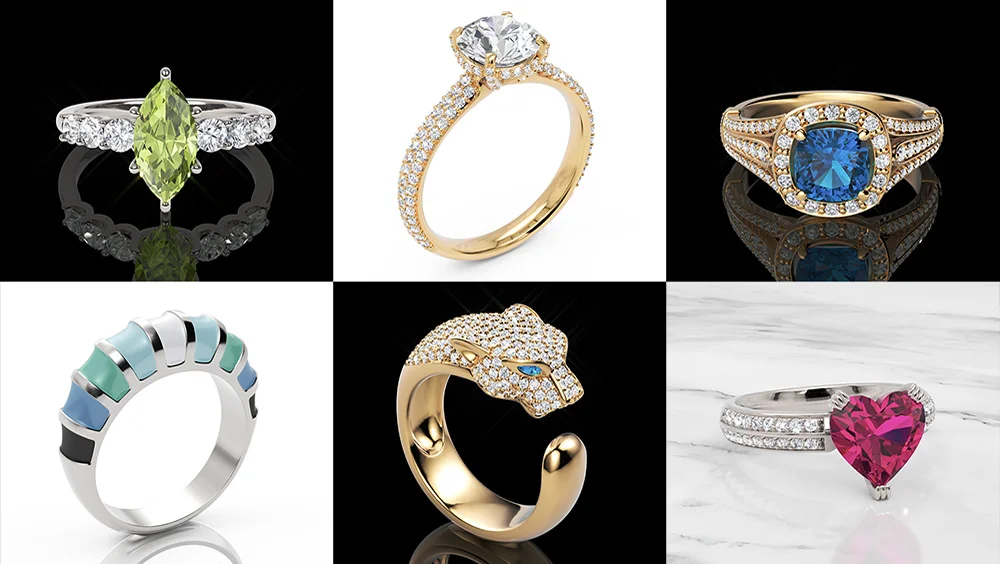
We’ve included several rings with different designs and materials: white gold, platinum, yellow gold, white and colored diamonds, rubies, sapphires, pearls, enamels… a little bit of everything Excelsior can produce.
These models make it incredibly easy to get hands-on and learn. Just experiment and explore.
Change materials, adjust the ring’s position to lay it down, switch between photorealistic ambiences, see how your piece looks under different jewelry photography setups, change the background color… and of course, render instant stills. And don’t forget to generate videos too! That’s where Maverick Excelsior truly shines with those irresistible sparkles.
How Do I Access the Demo?
Simply register on our website (or use Google login), and you’ll see a button in your dashboard to launch the Demo instantly.
And here’s a cheat sheet of Excelsior’s navigation controls:
Desktop
| Event | Action |
|---|---|
| Left Mouse Button | Orbit |
| Right Mouse Button | Pan |
| Mouse Wheel | Zoom |
Touch Devices
| Event | Action |
|---|---|
| One-Finger | Orbit |
| Two-Finger Drag | Pan |
| Pinch Gesture | Zoom |
What’s Different in the Demo vs. a Full License?
You can’t import your own 3DM models (Rhino, Matrix, MatrixGold… or any Rhino-based 3D jewelry modeling plugin). We know this is a annoying limitation, but allowing limited external model imports is a security challenge we are already considering working on. We’ve had lots of requests for this, and we’d love to hear how much you want it so we can prioritize it accordingly.
Embeddable 3D viewers for your website. This feature is only available in the Pro version of Maverick Excelsior. The future of online 3D jewelry lies in interactive viewing, letting customers switch materials on the fly, explore details up close, and fall in love with your designs which means more sales for you. Studies show that interactive models significantly increase conversion rates, and more and more jewelry e-commerce stores are adding this feature.
Shareable Viewer Links. In the Demo, you won’t be able to generate shareable links. But if we eventually allow the user upload their own models, this option will most likely be included.
So once again, let us know if you want these limitations lifted! Drop us a line at [email protected].
Questions? Reach Out Anytime!
I highly recommend browsing our documentation. It’s a quick read and includes a tutorial section packed with tips and tricks.
Maverick Excelsior Documentation →
That said, if you have any questions about Maverick Excelsior or if you would like a personal one-on-one demo, just fill out the form at the bottom of our Home Page.
Or feel free to email me directly at [email protected].
Happy rendering!
Ready to transform your jewelry business with 3D visualization? Get started with Excelsior today.